Plain-English activity logs for every action in your app.

EZLogs auto-captures every request, background job, and database change in your Rails or Next.js app, then turns each customer or agent action into one plain-English card your whole team can read.

Drop-in for Rails and Next.js · No card required · Read-only by design

01The problem

One customer action, told two ways.

Same order. Same data. Toggle to see what your server says — and what your team needs.

[2026-05-10 14:02:11] Started POST "/orders" for 78.96.x.x at 14:02:11
[2026-05-10 14:02:11] Processing by OrdersController#create as HTML
[2026-05-10 14:02:11]   Parameters: {"cart_id"=>"92", "address_id"=>"341"}
[2026-05-10 14:02:11]   User Load (0.4ms)  SELECT "users".* WHERE "id" = $1
[2026-05-10 14:02:11]   Cart Load (0.6ms)  SELECT "carts".* WHERE "id" = $1
[2026-05-10 14:02:11]    (1.1ms)  BEGIN
[2026-05-10 14:02:11]   Order Create (2.3ms)  INSERT INTO "orders" (...) RETURNING "id"
[2026-05-10 14:02:11]   OrderItem Create (1.8ms)  INSERT INTO "order_items" ...
[2026-05-10 14:02:11]    (4.2ms)  COMMIT
[2026-05-10 14:02:11] [ActiveJob] Enqueued ChargeCardJob (jid=7b3...) to Sidekiq(default)
[2026-05-10 14:02:11] Redirected to /orders/1247
[2026-05-10 14:02:11] Completed 302 Found in 89ms (ActiveRecord: 9.4ms)
[2026-05-10 14:02:12] [Sidekiq] ChargeCardJob start jid=7b3...
[2026-05-10 14:02:12]   Payment Create (3.1ms)  INSERT INTO "payments" ...
[2026-05-10 14:02:13]   Order Update (1.4ms)  UPDATE "orders" SET "status" = $1 ...
[2026-05-10 14:02:13]   Inventory Update (0.9ms × 3)  UPDATE "inventories" SET "stock" ...
[2026-05-10 14:02:13] [ActionMailer] Delivered confirmation_email to maria.chen@example.com
[2026-05-10 14:02:13] [Sidekiq] ChargeCardJob done jid=7b3... 1.2s

Maria Chen placed an order for 3 books

Order #1247 Payment #884 Cart #92 ✓ Success · 1.34 s
Maria placed an order for 3 books totaling €47.20. Payment cleared on the first attempt, inventory was decremented for all three titles, a confirmation email was queued, and the warehouse was notified to begin packing.
  1. POST /orders — 200, 89 ms
  2. Order #1247 created
  3. Order Item ×3 created
  4. ChargeCardJob started
  5. Payment #884 — €47.20, succeeded
  6. Order #1247 — pending → paid
  7. Inventory ×3 — stock −1 each
  8. Email queued + warehouse notified

Both views describe the exact same order. One is what your server says. The other is what your team actually needs.

02How it works

Three sources of truth, stitched into one story.

Every customer action lives at the intersection of these three signals. EZLogs captures all three and links them automatically.

Every request

The intent: who clicked what, from where, with which result.

Every background job

The reaction: every charge, email, restock — linked to the request that started them.

Every database change

The truth: every row your app touched, with before and after values.

Drop in one gem or one npm package. Zero per-route code.

02bConnect your AI

Same activity log. The way each person reads it.

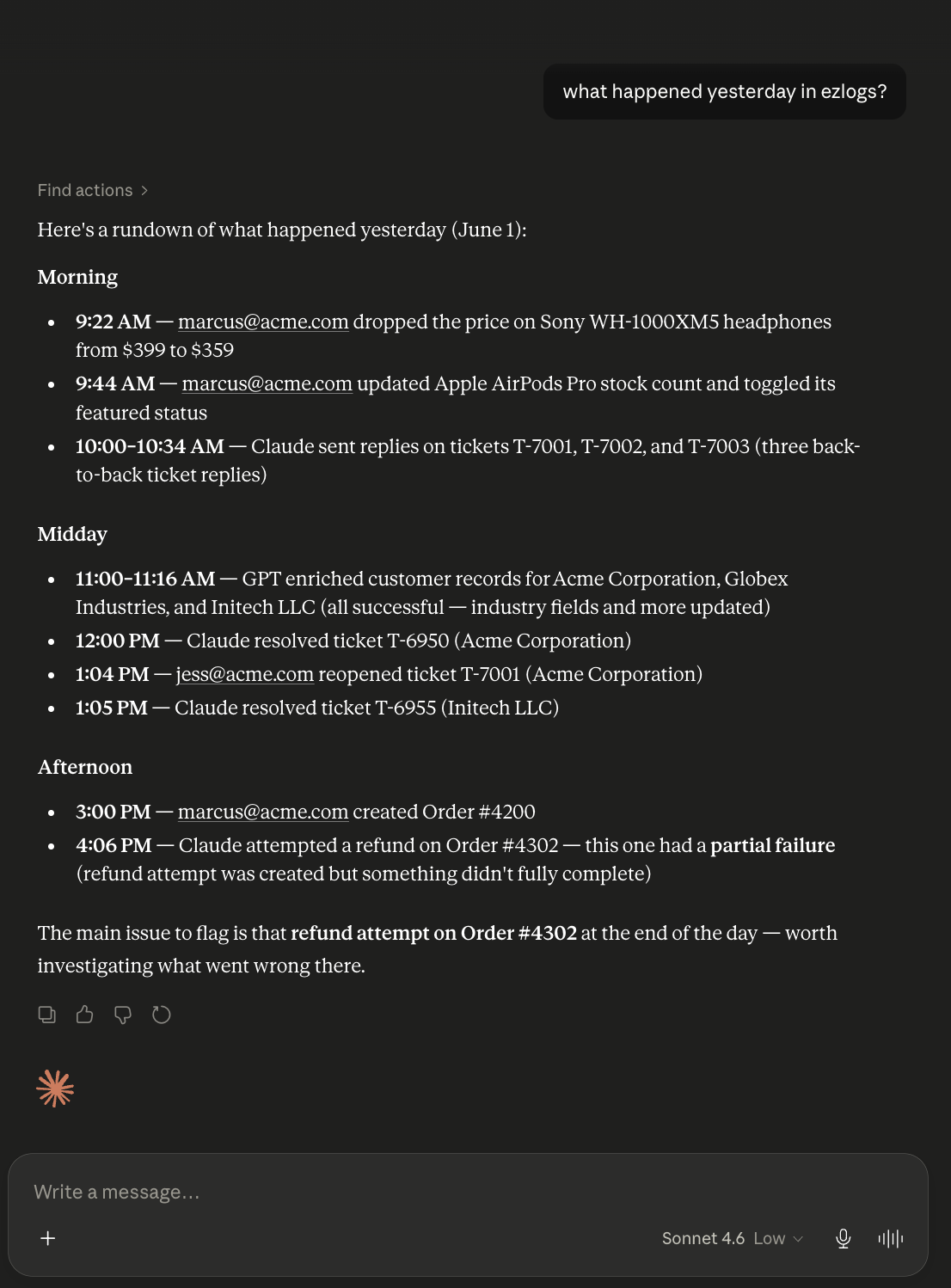
Your team reads the log on a page. Your AI reads it over MCP. Paste one URL into Claude Desktop, Cursor, Claude Code, or Codex, sign in once in the browser, and your AI now reads the same activity log your team trusts — same data, same answer, with citations.

Claude Desktop answering 'what happened yesterday in ezlogs?' with a Morning/Midday/Afternoon summary, real timestamps, actors and order IDs, ending in 'The main issue to flag is the refund attempt on Order #4302 at the end of the day.'

Paste https://app.ezlogs.io/mcp into Claude Desktop → Settings → Connectors (or Cursor, or Claude Code), click Authorize when the browser opens. Then ask “what happened yesterday?”

02cProof

This is what your team sees on day one.

Six real screens from a real company ("ACME-INC") after one week of using EZLogs. No mockups, no marketing edits — this is the product.

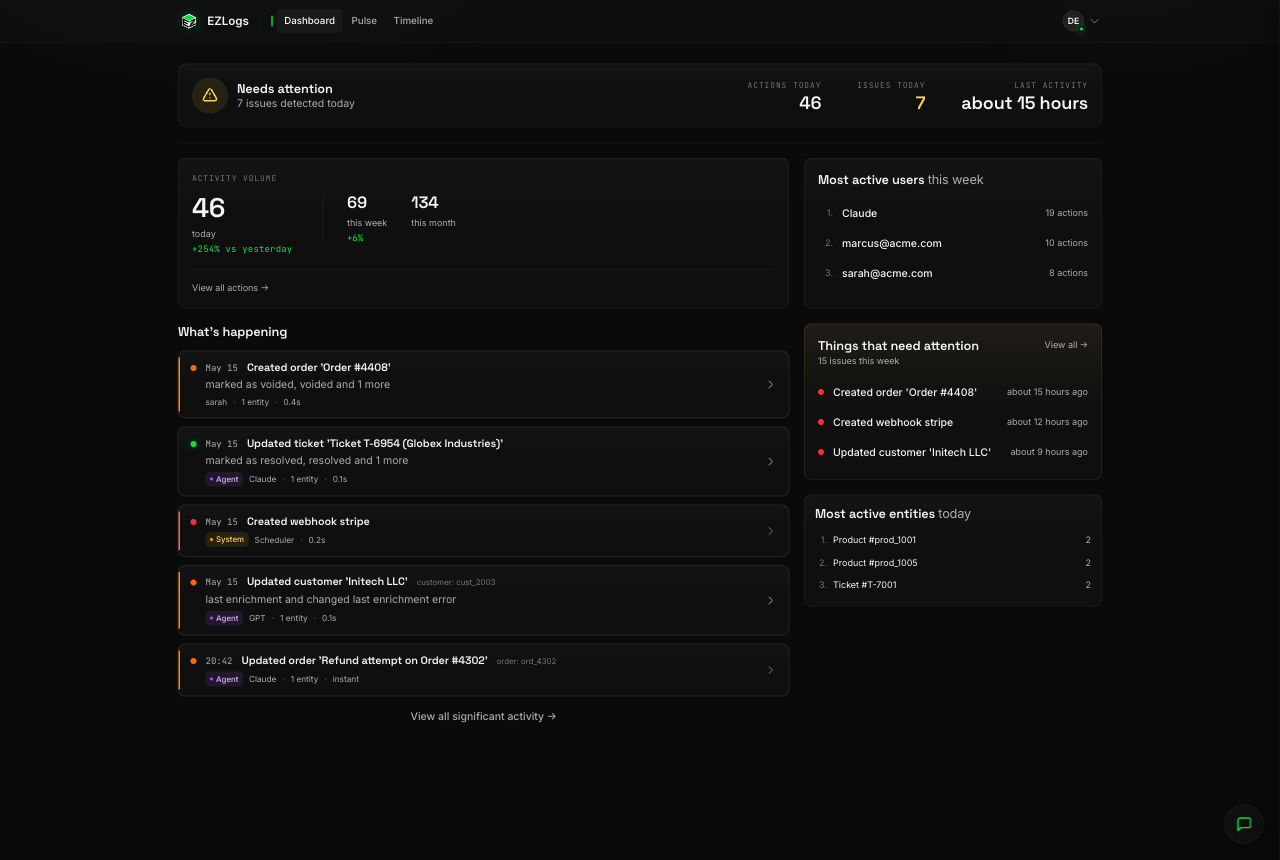
EZLogs dashboard: today's actions count, issues count, most active users + entities, what's happening feed
01 · Dashboard

Open it Monday morning. Know how your week's going.

How busy was the app today, what's gone wrong, who did the most work, what got touched the most. It reads like a status update someone wrote for you — "Created order 'Order #4408'", "Updated ticket 'Ticket T-6954 (Globex Industries)'" — not a wall of server logs.

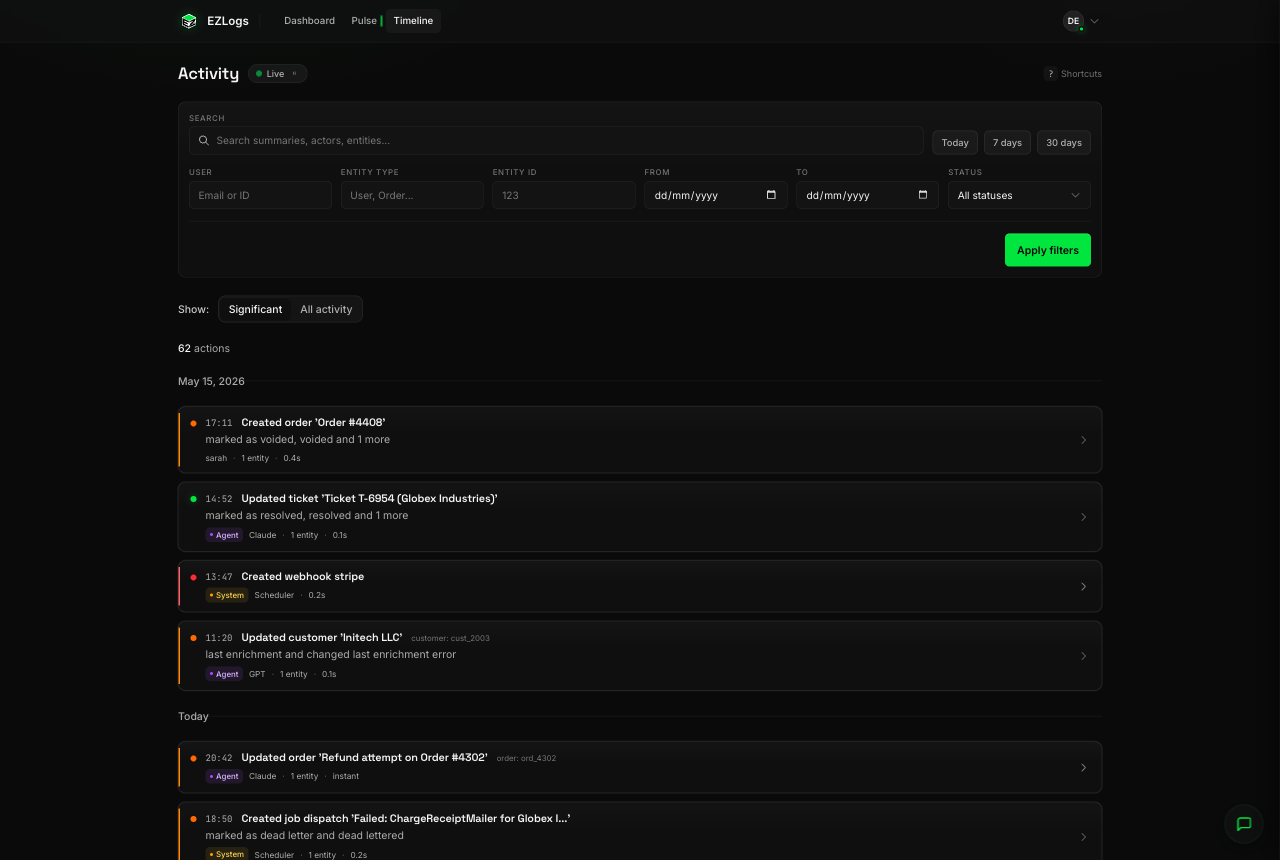
Activity timeline with filters: search, user, entity type, entity id, date range, status
02 · Timeline

Every action, by anyone, on anything — in one searchable feed.

"What did Sarah do yesterday?" "Who touched order #4408?" "Show me everything that failed this week." Type it, filter it, find it. The same feed your customer support team will live in.

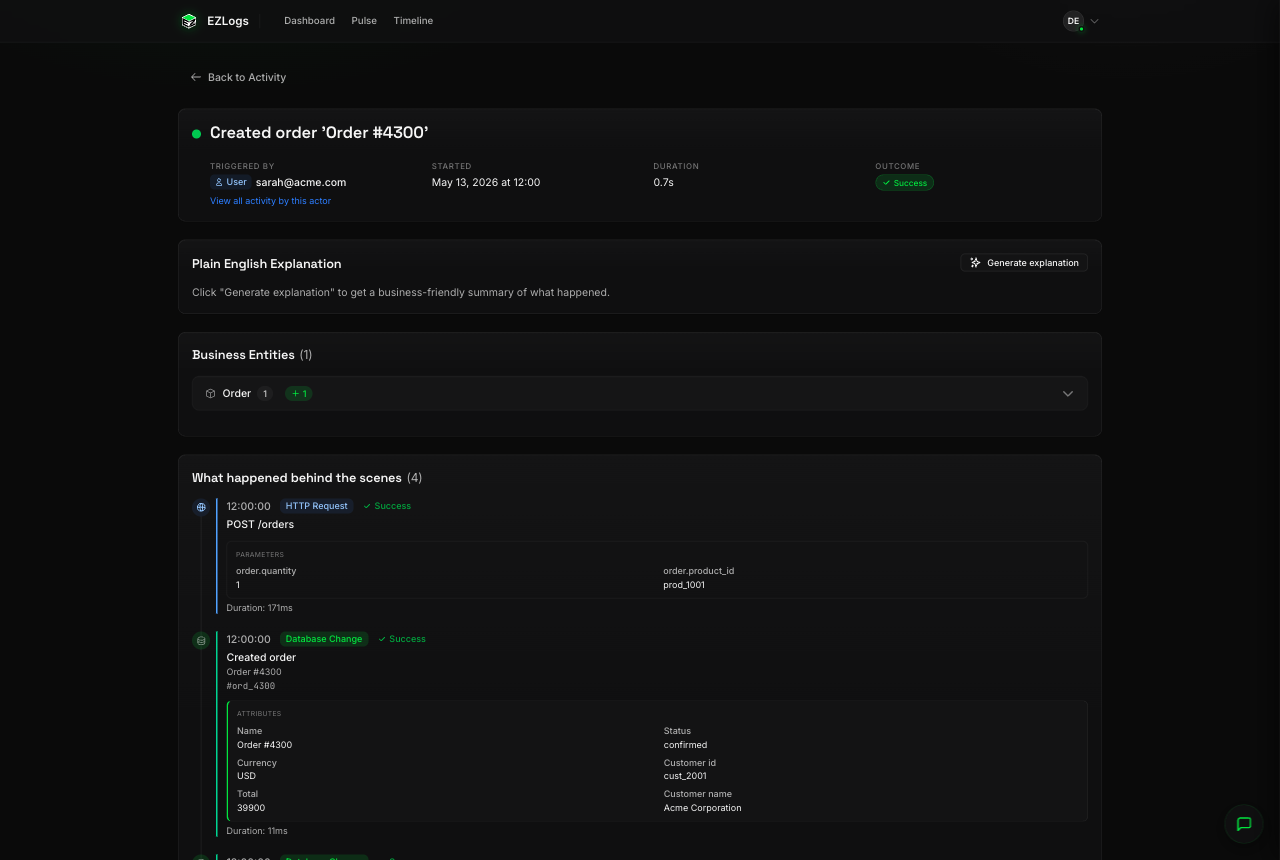
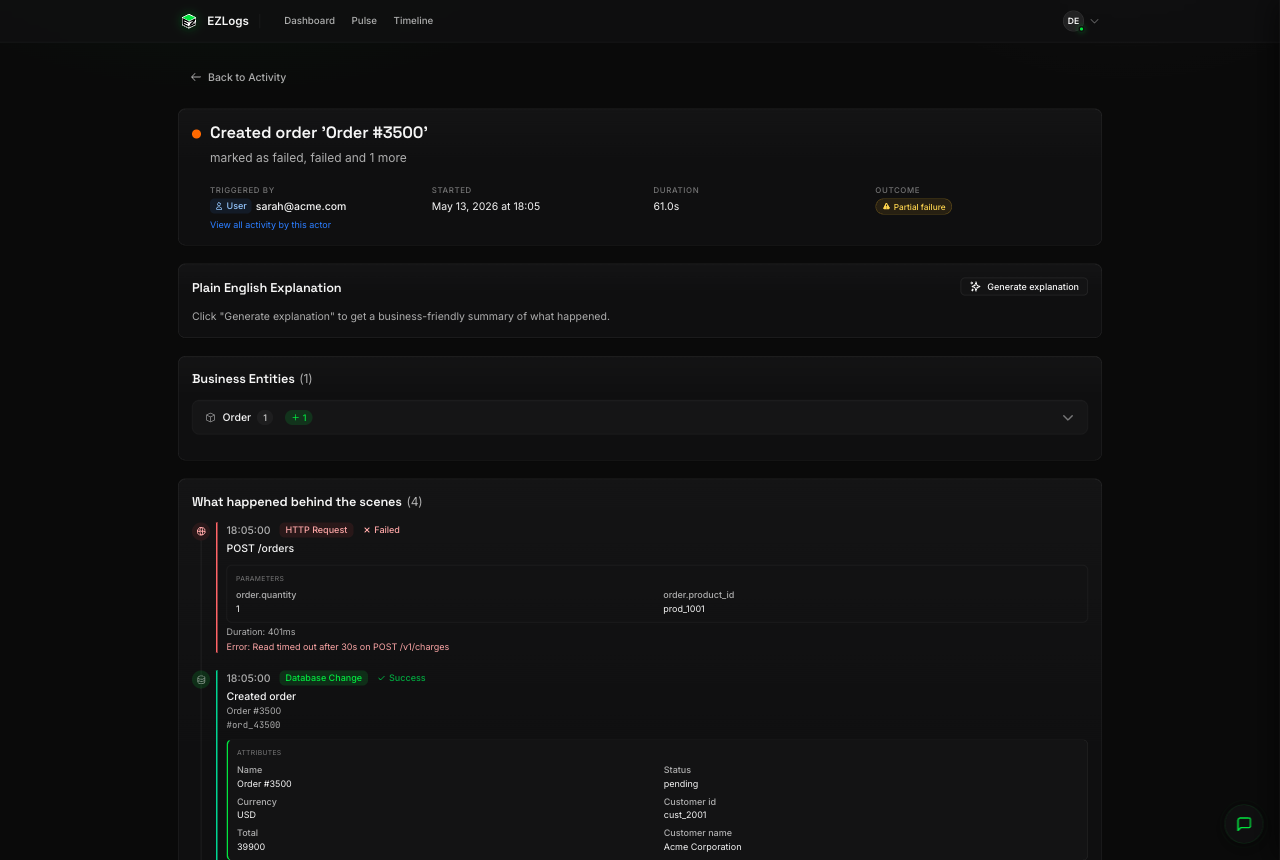
Action detail for 'Created order Order #4300': triggered by sarah@acme.com, business entities, behind-the-scenes events
03 · A single action, end to end

Click anything. See the whole story on one page.

Sarah placed Order #4300. Who, when, how long it took, did it succeed, what got created in the database. No more "let me ask engineering to check the logs" — the page is the answer.

Failed order action: Stripe gateway timeout, Order created in pending then flipped to failed, retry job also failed
04 · When things go wrong

When something breaks, you know what broke and why.

Order #3500 tried to charge a card. Stripe took 30 seconds and timed out. The order sits in pending. One glance and you know it's a payment problem — not "the website is down", not "the database crashed". You can tell the customer the truth.

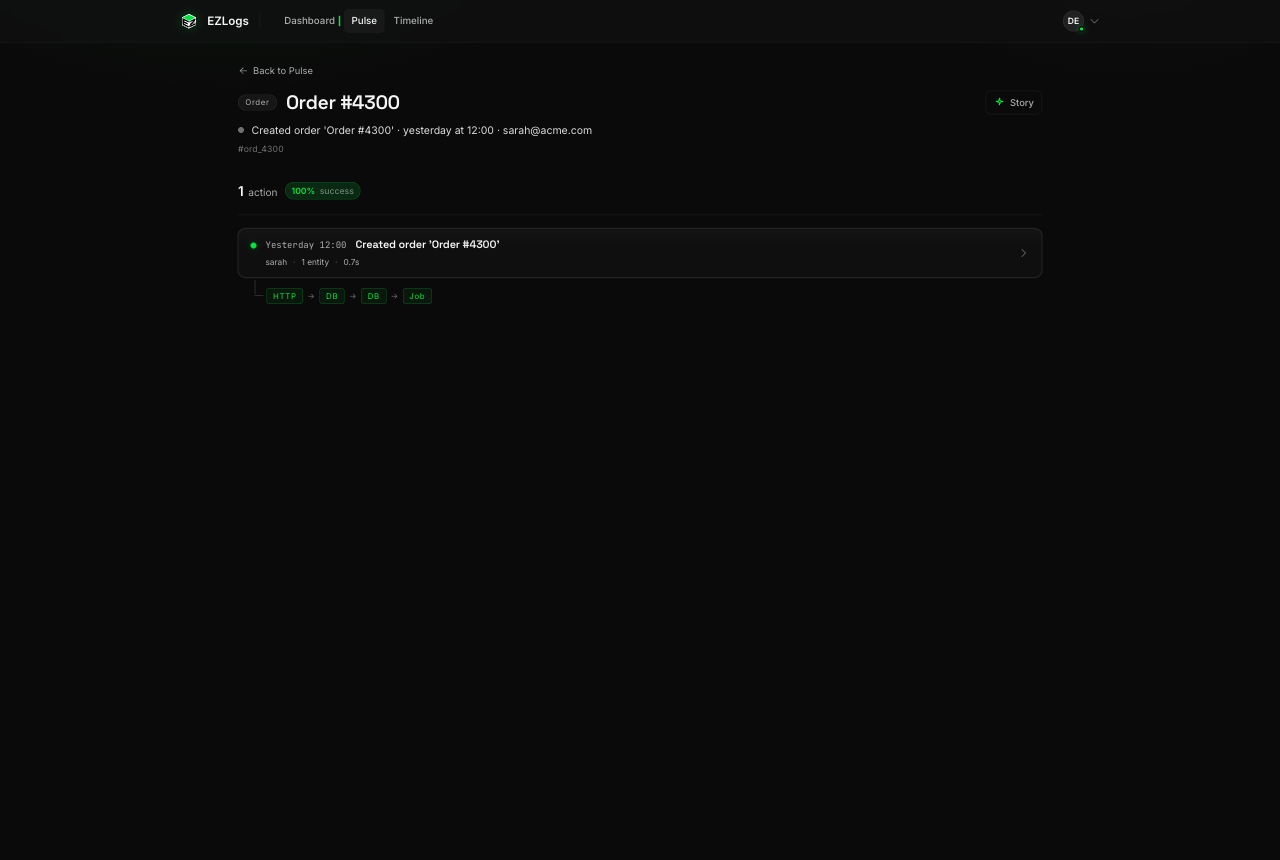
Pulse page for Order #4300: live state, recent activity, who touched it
05 · A live page for every thing in your app

Every order, every customer, every ticket — gets its own page.

Type the order number, open the page, send the link to anyone in your company. "Here's the full history of Order #4300." It updates itself as things happen. No screenshots, no Slack threads, no engineer in the loop.

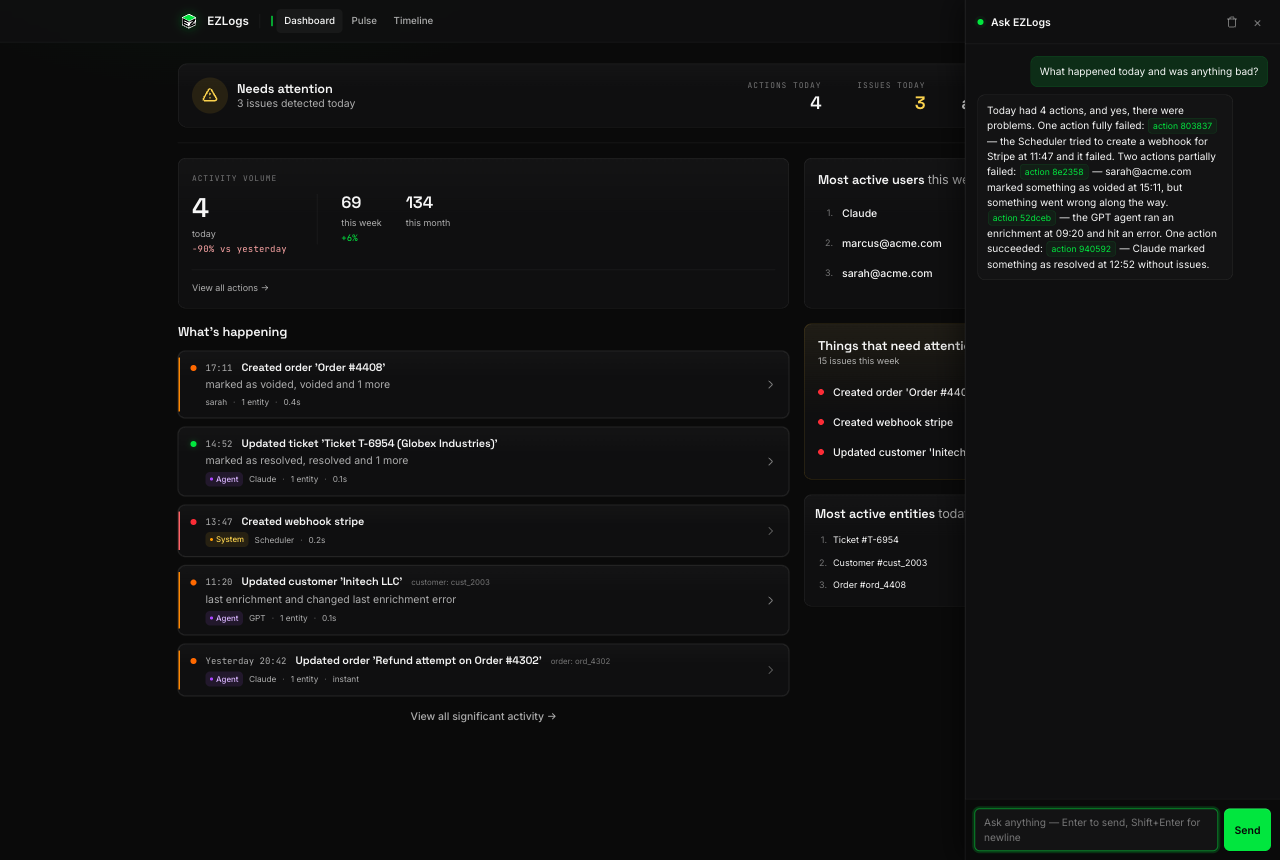
In-app chat answering 'What happened today and was anything bad?' with citation chips on every action mentioned
06 · Just ask

Don't want to click around? Just ask in plain English.

"What happened today and was anything bad?" "Who's our busiest customer this week?" "Why did Order #3500 fail?" The chat answers in a sentence, and every claim links straight to the action that proves it. No SQL, no dashboards to build.

03The product

This is one customer placing an order.

Read it top to bottom. No log files, no grepping, no engineers needed. The live card below is real product UI.

Maria Chen placed an order for 3 books

Order#1247 Payment#884 Cart#92
Triggered by
Maria Chen
Started
Today, 14:02:11
Duration
1.34 s
Outcome
Success

Plain English

Maria placed an order for 3 books totaling €47.20. Payment cleared on the first attempt, inventory was decremented for all three titles, a confirmation email was queued for her account, and the warehouse was notified to begin packing. Estimated dispatch: tomorrow.

Business entities

Order ×1 Order Item ×3 Payment ×1 Shipment ×1 Inventory ×3
Show 13 events behind the scenes Hide events
  1. POST /orders — 200, 89 ms, Maria Chen
  2. Order #1247 created — status: pending
  3. Order Item ×3 created — Snow Crash, Babel, A Wizard of Earthsea
  4. Cart #92 emptied
  5. ChargeCardJob started
  6. Payment #884 created — amount: €47.20, status: succeeded
  7. Order #1247 updated — status: pending → paid
  8. Inventory ×3 updated — stock −1 each
  9. SendOrderConfirmationJob enqueued
  10. NotifyWarehouseJob enqueued
  11. Email queued — order_confirmation → maria.chen@example.com
  12. Shipment #311 created — status: pending
  13. Warehouse notified — channel: warehouse-east
04Install

Two stacks. One install.

Drop the agent in. Restart. Done. No per-route code, no SDK to learn.

terminal1 line
$ bundle add ez_logs_agent
config/initializers/ezlogs.rb3 lines
EzLogs.configure do |c|
  c.api_key = ENV["EZLOGS_API_KEY"]
end

Auto-captures HTTP, Sidekiq / ActiveJob, and ActiveRecord changes. Zero per-controller code.

terminal1 line
$ npm install ezlogs-nextjs
next.config.ts2 lines
import { withEzlogsConfig } from "ezlogs-nextjs/plugin";
export default withEzlogsConfig({});

Auto-captures HTTP, Server Actions, and Postgres changes (via triggers). Works with App Router, Pages Router, Turbopack, Webpack.

Read the full setup guide →

05Who it’s for

Built so anyone in your company can read it.

Engineers ship it. Founders, support, and PMs read it. One shared vocabulary for what the product is doing.

For founders

You can finally see what your product is actually doing without asking an engineer.

For support

You can finally answer "what happened to this order?" in seconds — not Slack threads.

For engineers

You can finally point your CEO at a link instead of explaining.

Not a metrics tool. Not a replacement for Datadog. A shared vocabulary for what your software does — for the people who built it and the people who didn’t.

06Pricing

Try it free for 14 days.

Then pick the plan that fits your team. AI explanations, chat, MCP, public shares, GDPR data export — every paid tier includes the whole product. The difference is volume.

Free

€0

forever · 1 seat · 5k actions / mo · 25 chats · 14-day retention

Connect your AI in minutes. Includes 2 MCP tools + GDPR export.

Get started →

Team

€79

per month

Real SaaS teams.

  • 10 seats · 1.5M actions / month
  • 90-day retention
  • 2,000 chat messages / month
  • 15,000 AI explainer calls / month
  • Everything in Solo + audit exports
Start trial →

Business

€249

per month

Growing SaaS with audit needs.

  • 25 seats · 10M actions / mo
  • 180-day retention
  • 5,000 chat messages / month
  • 50,000 AI explainer calls / month
  • Everything in Team
Start trial →

Scale

€799

per month

High-volume products and compliance teams.

  • Unlimited seats · 50M actions / mo
  • 365-day retention
  • 30,000 chat messages / month
  • 200,000 AI explainer calls / month
  • Everything in Business
Start trial →

Enterprise

Custom

SSO/SAML · DPA · SLA · EU data residency · on-prem option

For audit-conscious teams beyond Scale. Custom volume, dedicated support.

Talk to sales →

MCP access is unlimited on every paid tier — chat-message limits do NOT apply to MCP. MCP is consumed by your AI, which spends its own credits to narrate the data it queries. We just deliver the structured rows.

Monthly plans cancel anytime. Annual plans billed once a year. VAT added at checkout for EU customers. Overage packs (€10/500 chat, €10/100k actions) available on Solo and above.

07FAQ

Questions, answered.

The nine things people actually ask. Click any to expand.

What does EZLogs actually do?

It records every request, background job, and database change in your app, links them by user action, and turns each chain into one plain-English card — so anyone on your team can read what happened, not just the engineers.

Will it slow down my app?

No. The agent runs out-of-band: events are buffered in memory and shipped to EZLogs over a separate connection. If our service is down, the agent fails open and your app keeps running. Average overhead in benchmarks: under 1 ms per request.

What happens if EZLogs is down?

Your app keeps serving traffic. The agent buffers up to 10,000 events in memory and retries with exponential backoff. If the buffer overflows, it drops the oldest events — never the customer's request.

How is this different from Datadog, New Relic, or Honeycomb?

Those tools are for engineers, and they answer "is the system healthy?" EZLogs is for everyone, and it answers "what happened to my customer?" We don't compete with metrics. We're the layer above them.

Do you store my customer data?

We store the events your app sends us — request paths, job names, table names, and the before/after values you explicitly capture. We do not store request bodies, response bodies, or full database rows unless you opt in. Field-level redaction is on by default for any column matching password, token, secret, key, or *_at timestamps.

What languages and frameworks are supported today?

Ruby on Rails (Sidekiq, ActiveJob, ActiveRecord) and Next.js (App Router, Pages Router, Server Actions, Prisma, Drizzle, supabase-js, BullMQ, Inngest, Trigger.dev, Upstash, Supabase Queues). FastAPI is next.

Can I self-host?

Not yet. Self-host is on the post-launch roadmap. If self-hosting is a hard requirement for you, email us — we want to talk.

Is the AI explanation accurate?

The AI only writes sentences using the structured events your app actually sent. It never invents data. If it doesn't know, it says so. Every generated explanation is cached and reproducible — re-running the same action produces the same words.

What happens when my free trial ends?

Your account auto-downgrades to our Free plan (5,000 actions/month, 25 chat messages, 14-day retention) — no lockout. Your data stays viewable for 30 days while you decide whether to upgrade. Pick a paid plan any time; the agent reconnects on its next request, no redeploy needed.

What's the difference between the trial and the Free plan?

The 14-day trial gives you Business-tier chat (5,000 messages/mo) and AI explainer (50,000 calls/mo) with up to 500,000 actions ingested — full product access. The Free plan is forever-free with smaller limits (5,000 actions, 25 chat, 100 explainer) so you can keep using EZLogs on a small project even after the trial.

Can I export my data?

Yes. /settings/data-export gives you a full JSON archive of every action, event, actor, and entity we have on file. Available on every plan, including Free — GDPR Article 20 compliant.

How does MCP pricing work?

MCP access is unlimited on every paid tier. Chat-message limits do NOT apply to MCP. This is intentional — MCP is consumed by your AI (Claude, Cursor, your internal copilot), which spends its own credits to narrate the data it queries. We just deliver the structured rows. The only meters that exist are: actions ingested, in-app chat messages, AI explainer calls. On Free, you get two of the six MCP tools: find_actions (browse activity) and top_lists (busiest actors, hottest entities). Enough to try MCP on a real project; paid tiers unlock the other four (action detail, actor / entity timelines, comparisons) plus MCP prompts.