EZLogs over MCP
Ask Claude, ChatGPT or Cursor what happened in your app
EZLogs turns the requests, background jobs and database changes in your Rails or Next.js app into plain-English actions. The EZLogs MCP server lets the AI assistant you already use read that log, so you can ask it what happened, who did it and what failed. It can only read. It cannot change anything in your app.
https://app.ezlogs.io/mcpSign in with your EZLogs account (OAuth). Requires the EZLogs agent installed in a Rails or Next.js app. Free during the beta.
What your AI can see
- Actions: one plain-English card per thing that happened, built from the request, the jobs it started and the database rows it changed. For example “Refund failed: card expired”.
- Actors: who did it: a person, an AI agent, or the system.
- Entities: the business records involved, such as an order, a booking or a project, with their history.
- Failures: what went wrong and why, including partial failures where one step failed.
Example: a night of ferry rebookings
These answers come from a demo account: Brackwater Ferries, a fictional ferry company where an AI rebooking assistant handles disrupted bookings. A gale cancelled two sailings overnight.
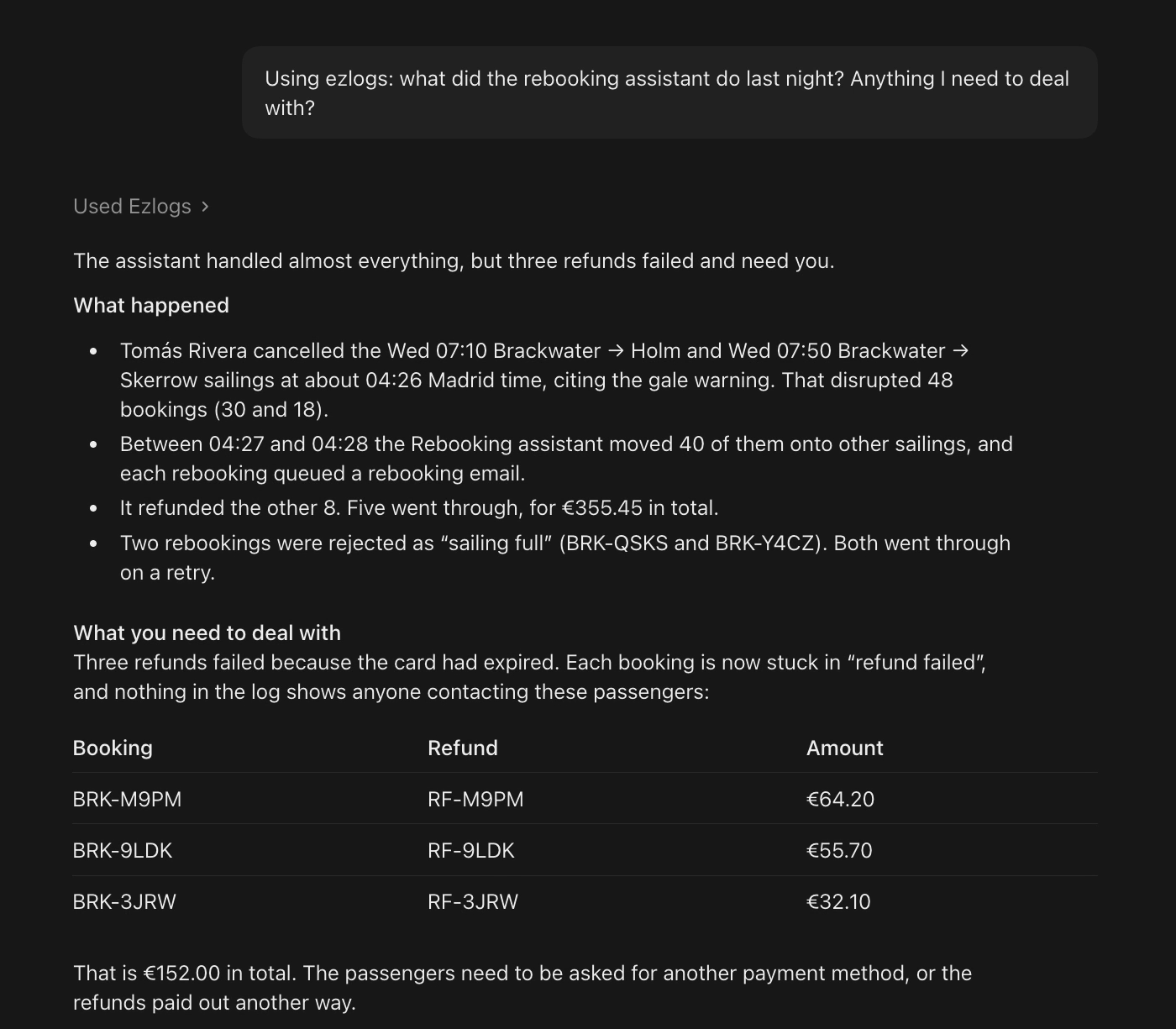
“What did the rebooking assistant do last night? Anything I need to deal with?”
Two sailings were cancelled at about 04:26, citing the gale warning, which disrupted 48 bookings. The Rebooking assistant moved 40 onto other sailings and refunded the other 8. Five refunds went through (€355.45). Three failed because the card had expired, and those bookings are now in “refund failed”.
“What happened to refund RF-M9PM?”
It failed at 03:27 UTC. The Rebooking assistant tried to refund €64.20 for booking BRK-M9PM. The refund went from pending to failed because the card had expired, and the booking was marked “refund failed”.
“Which refunds failed, and how much money is stuck?”
Three: RF-M9PM (€64.20), RF-9LDK (€55.70) and RF-3JRW (€32.10), €152.00 in total. Nothing in the log shows anyone contacting these passengers yet.
“Were any rebookings rejected?”
Two were rejected as “sailing full” (BRK-QSKS and BRK-Y4CZ). Both went through on a retry.
Other questions that work well: “What did sarah@example.com do today?”, “Show me failed checkouts this week”, “Who were the most active users in the last 7 days?”, “Why did this order succeed and that one fail?”.
Connect your AI assistant
Every client uses the same URL, https://app.ezlogs.io/mcp, and signs in through your browser. No API key to copy.
Claude (claude.ai and Claude Desktop)
- Open Customize → Connectors → Add custom connector.
- Name it
EZLogsand pastehttps://app.ezlogs.io/mcp. - Select Connect and sign in to EZLogs.
On Team and Enterprise plans an owner may need to add the connector for the organisation first.
Claude Code
claude mcp add --transport http ezlogs https://app.ezlogs.io/mcpThen run /mcp inside Claude Code and choose ezlogs to sign in.
ChatGPT
Custom MCP connectors need a paid ChatGPT plan, and on Business or Enterprise an admin may need to allow them. Turn on Developer mode in Settings (under Apps → Advanced), then create a connector with the URL https://app.ezlogs.io/mcp and OAuth authentication. ChatGPT moves these menus from time to time; the connector itself stays the same.
Cursor
Open Cursor’s Customize page and add a new MCP server with the URL. Or add this to ~/.cursor/mcp.json:
{
  "mcpServers": {
    "ezlogs": { "url": "https://app.ezlogs.io/mcp" }
  }
}
Cursor asks you to sign in the first time.
Codex
codex mcp add ezlogs --url https://app.ezlogs.io/mcp
codex mcp login ezlogs
Lovable
Open Connectors → Add custom → MCP server, paste the URL, keep OAuth, then add and authorize. If MCP server is greyed out, a workspace admin has turned custom servers off.
Tools (all read-only)
Every tool is marked readOnlyHint: true. None of them can create, change or delete anything, in EZLogs or in your app.
| Tool | What it does |
|---|---|
find_actions | Search actions by text, actor, entity, outcome (success, failure, partial failure), intent and date. Answers “what happened” questions. |
get_action | Open one action with its full list of events (requests, jobs, database changes). |
actor_timeline | One person’s or agent’s recent actions, plus their current state with links to the actions behind each value. |
entity_timeline | One record’s recent actions (an order, a booking, a project), plus its current state. |
top_lists | The most active actors and entities over a window of up to 90 days. |
compare_actions | Compare 2 to 5 actions and show where they first differ. Useful when one worked and one failed. |
Security and privacy
- Read-only by design. EZLogs holds no write credentials into your app. The MCP server can only answer questions. See Security.
- OAuth sign-in. Each connection belongs to one user and one EZLogs company. Access tokens are short-lived, and you can revoke a connected app any time from Settings → Connectors → MCP.
- Hosted in the EU. Data is stored on Hetzner servers in Germany.
- Masked at the source. The agent masks fields named like passwords, tokens, secrets, API keys and card numbers inside your app before anything is sent. Raw request and response bodies are never sent.
- One redaction layer. Everything that leaves EZLogs (MCP, share links, embeds, exports) passes through the same redaction step. Over MCP you see your own data in full, because it is your AI reading your log.
FAQ
Can my AI assistant change anything in my app through EZLogs?
No. All six tools only read your activity log. EZLogs has no write access to your app, and the MCP server has no tools that create, update or delete anything.
Do I need an EZLogs account?
Yes. The MCP server reads the activity log EZLogs collects from your app, so you need an EZLogs account (free during the beta) with the agent installed in a Rails or Next.js app. Without it there is nothing to query.
Which AI clients work?
Any client that supports remote MCP servers over HTTP with OAuth and dynamic client registration. We have setup steps above for Claude (claude.ai and Claude Desktop), Claude Code, ChatGPT, Cursor, Codex and Lovable.
Who can see my data?
Only people in your EZLogs company, the AI clients they sign in, and the subprocessors on our Subprocessors page (hosting in Germany, and the AI providers used for optional explanations). Each connection is tied to one user, can be revoked from Settings → Connectors → MCP, and uses short-lived access tokens. Data is stored in Germany (EU).
Does EZLogs use AI to make up the answers?
No. The tools return actions built from the real events your app sent: requests, background jobs and database changes. Your AI assistant writes the answer from that data, and each action has an id you can open in EZLogs to check it.
No card required · Read-only by design